

How kbagent works
The concepts behind the kbagent CLI — the connection and config model, multi-project and stacks, development-branch propagation, GitOps sync, and the permission firewall and agent sandboxing.
This page explains the ideas behind kbagent so the commands make sense. You don’t need it to get going — Get started is enough for that — but it’s worth reading before you script kbagent or hand it to an agent.
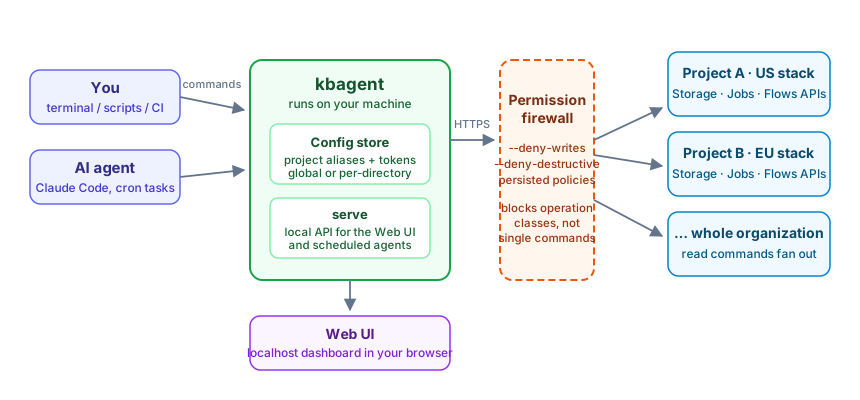
Everything below is that picture in words: connections feed the config store, the firewall decides what may pass, and the same commands address one project or the whole organization.
Connections and config
Section titled “Connections and config”kbagent doesn’t log in interactively. You register connections — a project alias, its stack URL, and a token — and kbagent stores them in a config file it reads on every command:
- Global config (default):
~/Library/Application Support/keboola-agent-cli/config.jsonon macOS,~/.config/keboola-agent-cli/config.jsonon Linux (kbagent doctorprints the active path). Shared across all your shells. - Local config: run
kbagent initin a directory to create a project-scoped.kbagent/workspace. When present, it takes precedence over the global config, so different repos can target different projects.
kbagent doctor tells you which config is in effect and whether each connection is healthy.
Multi-project and stacks
Section titled “Multi-project and stacks”A single kbagent install can hold many projects across many stacks (US/EU, AWS/Azure/GCP). Commands accept --project <alias>; set a default with kbagent project use. Read commands like search, job list, and lineage can fan out across all connected projects at once — the reason kbagent is useful for organization-wide audits, not just one project.
You connect projects one at a time (project add, a Storage token each) or in bulk (org setup with a Manage API token, which registers every project and mints per-project tokens).
Development-branch propagation
Section titled “Development-branch propagation”Keboola development branches let you change configurations without touching production. kbagent makes a branch the active context: create or select one, and subsequent operations target it automatically instead of production. kbagent sync branch-link maps a git branch to a Keboola dev branch, so checking out a git branch lines up your local files with the right Keboola branch.
GitOps sync
Section titled “GitOps sync”kbagent sync turns a project’s configurations into local files you can version:
sync pullwrites configs to a working tree,sync status/sync diffshow what changed,sync pushapplies local edits back to Keboola.
This is how you back up a project, review configuration changes in pull requests, or promote changes between environments — the same Git workflow you already use for code.
The permission firewall
Section titled “The permission firewall”kbagent is designed to be run unattended and by agents, so it has a layered firewall that blocks classes of operations regardless of what a command tries to do:
--deny-writes— the wide net: block every write, destructive, and admin operation (project add/remove/edit, org setup, all Storage mutations) for the session.--deny-destructive— block only data-destructive operations (delete table/bucket/config, terminate job, delete branch); admin ops are not blocked.kbagent permissions …— persist a policy instead of passing a flag each time.kbagent init --from-global --read-only— a read-only local workspace.
These compose: a persisted policy plus a session flag both apply. This is what lets you give an agent real capability without real risk — see Use with AI agents.
Agent-first design
Section titled “Agent-first design”Two things make kbagent good for AI agents rather than only humans:
- Structured output —
--jsonon any command returns machine-readable results ({ "status": "ok", "data": … }), so an agent parses instead of scraping. - A self-describing reference —
kbagent contextprints the full, version-matched command reference as Markdown, so an agent works from what your installed version actually supports.
Related
Section titled “Related”- Get started — the guided first run.
- How-to guides — these concepts applied to real tasks.
Next: How-to guides →